


Configure SITE Cloud DNS Nameservers on Linux VMs
DNS (Domain Name System) is a fundamental technology that translates human-readable domain names (e.g., www.example.com) into IP addresses that computers use to identify each other on a network. Setting up DNS nameservers on Linux distributions like Ubuntu, CentOS, RHEL, and Oracle Linux is essential for proper network communication, as it enables your system to resolve domain names to IP addresses.
This manual will guide you through the process of setting DNS nameservers on these Linux distributions, ensuring smooth connectivity and efficient network communication.
Getting Started:
Prerequisites
Before you begin, make sure you have the following:
- Administrative privileges (sudo or root) on your Linux system.
- IP addresses of the DNS nameservers you want to use. These can be SITE Cloud DNS (100.64.3.140 and 100.80.0.175).
- Apply similar rule to the below on your VM.

1. Ubuntu:
- a. Open a terminal.
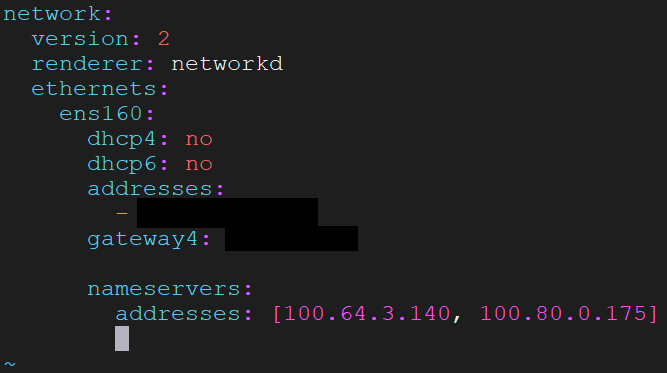
- b. Edit the /etc/netplan/99-netcfg-vmware.yaml file using your preferred text editor (e.g., nano, vim).
- c. Add a nameservers section with the IP addresses of DNS nameservers, indented under addresses:
nameservers:
addresses: [100.64.3.140, 100.80.0.175]
- d. Save the file and apply the changes by running:
sudo netplan apply
2. CentOS/RHEL/Oracle Linux:
- a. Open a terminal.
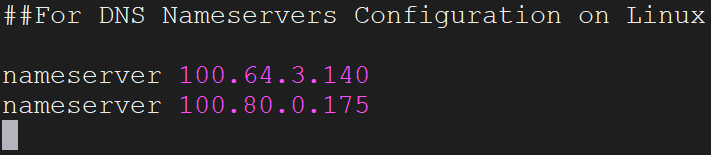
- b. Edit the /etc/resolv.conf file using your preferred text editor.
- c. Add the IP addresses of the DNS nameservers at the top of the file:
nameserver 100.64.3.140
nameserver 100.80.0.175
- d. Save the file.
Safety and Security:
While configuring DNS nameservers is generally safe, it's essential to be aware of potential security concerns:
- Use Trusted DNS Servers: When choosing DNS servers, prefer well-known and reputable providers like SITE Cloud DNS (100.64.3.140, 100.80.0.175).
- Avoid Untrusted Sources: Be cautious of DNS servers from untrusted sources, as they may compromise your privacy and security.
- Double-Check Configuration: Before applying changes, review your netplan file to ensure there are no syntax errors that might disrupt network connectivity.
- Regular Updates: Keep your system and software up to date to benefit from security patches and improvements.
- Firewall Rules: Maintain proper firewall rules to restrict DNS access to trusted networks.
- DNSSEC: Consider implementing DNSSEC (Domain Name System Security Extensions) to enhance DNS security by validating responses from DNS servers.
Glossary and References:
DNS: Domain Name System, a system that translates domain names to IP addresses.
IP Address: A numerical label assigned to each device on a computer network.
Linux: An open-source Unix-like operating system kernel.
netplan: Network configuration utility on Ubuntu.
resolv.conf: DNS configuration file on CentOS, RHEL, and Oracle Linux.
References:
- Ubuntu Netplan documentation: https://netplan.io/
- CentOS documentation: https://wiki.centos.org/
- RHEL documentation: https://access.redhat.com/documentation/en-us/red_hat_enterprise_linux/
- Oracle Linux documentation: https://docs.oracle.com/en/operating-systems/oracle-linux/