


Static Routes
Static Route Feature Documentation
1. Definition
A static route is a manually configured path that defines how network traffic should travel to a specific destination. Unlike dynamic routing, which automatically adjusts based on network conditions, static routes offer fixed paths that require manual configuration. This provides more control and predictability in traffic flow.
2. Sample Use Cases
- Custom routing requirements: In SITE Cloud environment, when multiple routes are available, the oldest environment in the routing table takes precedence unless explicitly overridden by adding a new static route. This feature adds stability and reliability, especially in multi-environment or long-term setups.
- Replication Network prioritization: Advertise the replica network in the replication destination environment to ensure it takes precedence over the source environment's network.
- VPN Traffic Routing: Static routes are essential in VPN configurations where network traffic needs to be routes through secure tunnels.
3. Step-by-Step Guide: Setting Up a Static Route
Step 1: Log in to My Cloud Portal
• Access your cloud account and navigate to the networking category.
Step 2: Access Static Route Page
• click on Static Route item that is inside Networking category from the side menu navigation.
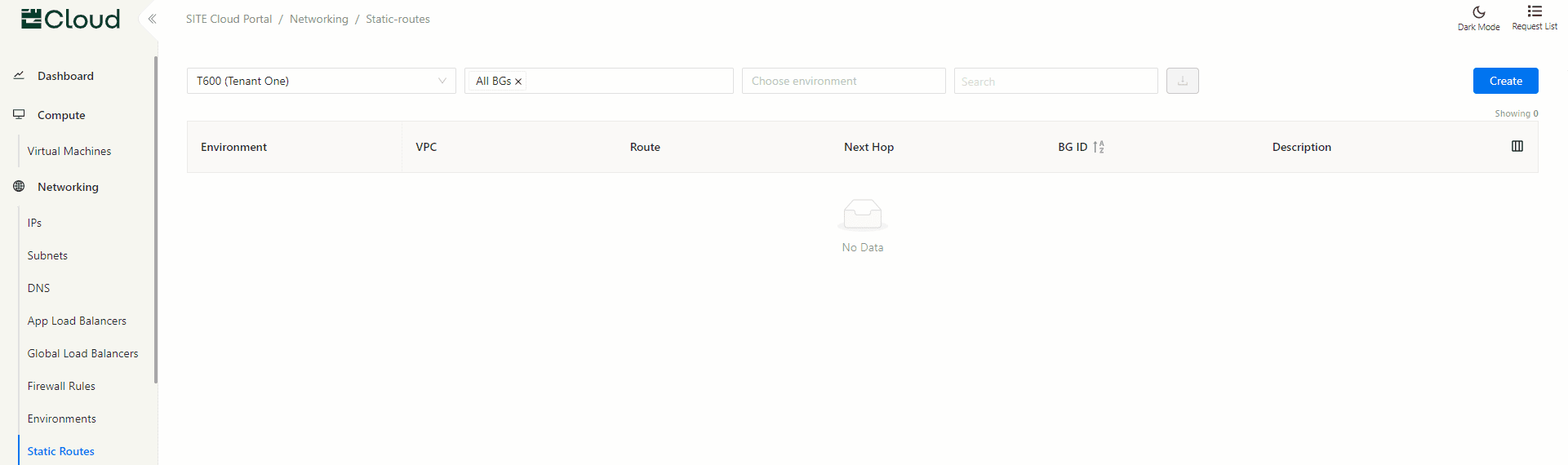
Step 3: Add a New Static Route
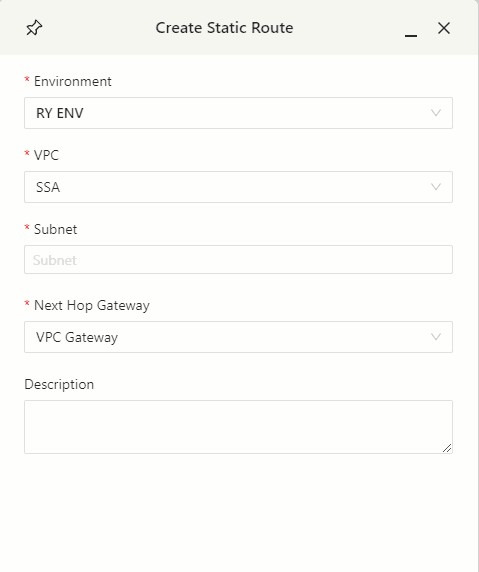
• Select “Create” from the static route page.
• Environment: Input the target Environment.
• VPC: Input the target VPC.
• Subnet: Input the target Subnet. This subnet needs to be part of an existing Cloud Subnet specified in the Subnet Page.
• Next Hop Gateway: Define the next hop, such as another VM or VPC gateway.
• Description: Optional free text field for your description and comments.
Step 4: Review and Apply the Route
• Verify all route details before applying the configuration. Once confirmed, the static route will be applied immediately.
4. Best Practices
• Regularly review your static routes to ensure they align with your network architecture and any infrastructure changes.
• Use descriptive names for static routes to simplify future troubleshooting and management.
• Be mindful of the precedence rule for the oldest environment when setting up or modifying routes.