

Search...


Billing Credit
Credit
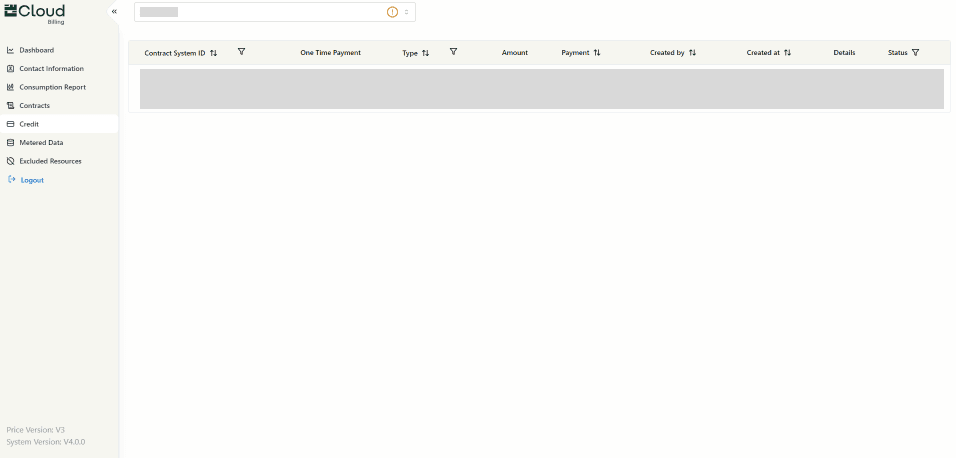
It's the details about available credit and any limits related to project scope. While credit information can be viewed here, any modifications require administrative support.
Credit Information
- View Credit Details: This section allows access to view the current credit balance and associated limits relevant to the project.
- Project Scope Adjustments: Credit is directly tied to the scope of the project, but increasing the scope requires changes to the credit allocation.
Sections Displayed:
- Contract System ID: A unique identifier for the system associated with the contract and credit.
- One-Time Payment: If there is any one-time payments related to the project.
- Type: Specifies the type of credit or payment (e.g., Invoice, Reward Points, etc.).
- Amount: The total amount of credit or payment made.
- Payment: Displays the payment method or transaction details.
- Created By: The name of the person who created the credit entry or payment record.
- Created At: The date and time when the credit entry or payment record was created.
- Details: Any additional information or context related to the credit, payment, or project scope.
- Status: The current status of the credit or payment (e.g., Active, Inactive).
Important Notes
- No Direct Additions: It's important to note that additional amounts cannot be directly added to the account via this page.
- Modifications or Adjustments: If credit modifications are required or there are inquiries related to increasing the project scope, kindly raise a ticket through our Support Portal
Updated at 2024-10-08
On this page