

Search...


User Management
User Management
Overview
this new feature will greatly enhance your user management experience and provide you with greater control and flexibility. With the latest update, you will now be able to perform the following actions within SITE Cloud Portal to Manage User:
- Create, Modify, Delete, and Activate Users: Easily manage user accounts and make necessary updates as per your requirements.
- Grant Authorization for SITE Cloud Services: You can now assign access rights to various essential portals and services, including the Monitor Portal, Support Portal, Cloud Portal, Cloud Billing, and Site Access.
- Streamline Notifications: Ensure that the right individuals receive operation and security notifications by setting up personalized notification preferences.
- User Role Definition: Define specific roles for users based on their responsibilities. Choose from roles such as Technical Owner, Business Owner, or Security Representative L1 or L2 to align user access with their respective roles.
Pre-requests
- created tenant on SITE Cloud
- created business groups
step-by-step guide
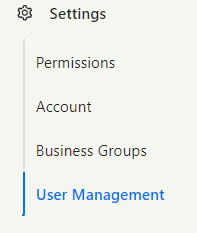
- first go to user management tab under settings group on the left side menu:
- click create on the top right corner and fill the required Fields and chose the right Authorization then click submit:

- hovering on the user you can edit user information and authorization:

- and clicking the three dots you can reset user password or deactivate/activate user:

Updated at 2025-01-22