


Design & Implement a 3-Tier Architecture Application - Zero to Hero in SITE Cloud
1. Introduction
1.1 Purpose
This manual provides guidance on designing a 3-tier architecture application with a Load Balancer (LB), a Web Application Firewall (WAF), an SSL Termination Zone, an Application VMs zone, and a DB VMs zone. A 3-tier architecture is a widely adopted approach for building scalable and secure web applications. This manual will help you understand the concepts and steps required to design and implement such an architecture in SITE Cloud.
1.2 Target Audience
This manual is intended for SITE Cloud users including system architects, network administrators, and developers who want to design a robust and scalable architecture for their web applications.
1.3 Scope
This manual covers the design considerations and best practices for each tier of the 3-tier architecture:
- Tier 1: Load Balancer, Web Application Firewall, and SSL Termination Zone.
- Tier 2: Application VMs Zone.
- Tier 3: Database VMs Zone.
2. Getting Started
2.1 Design
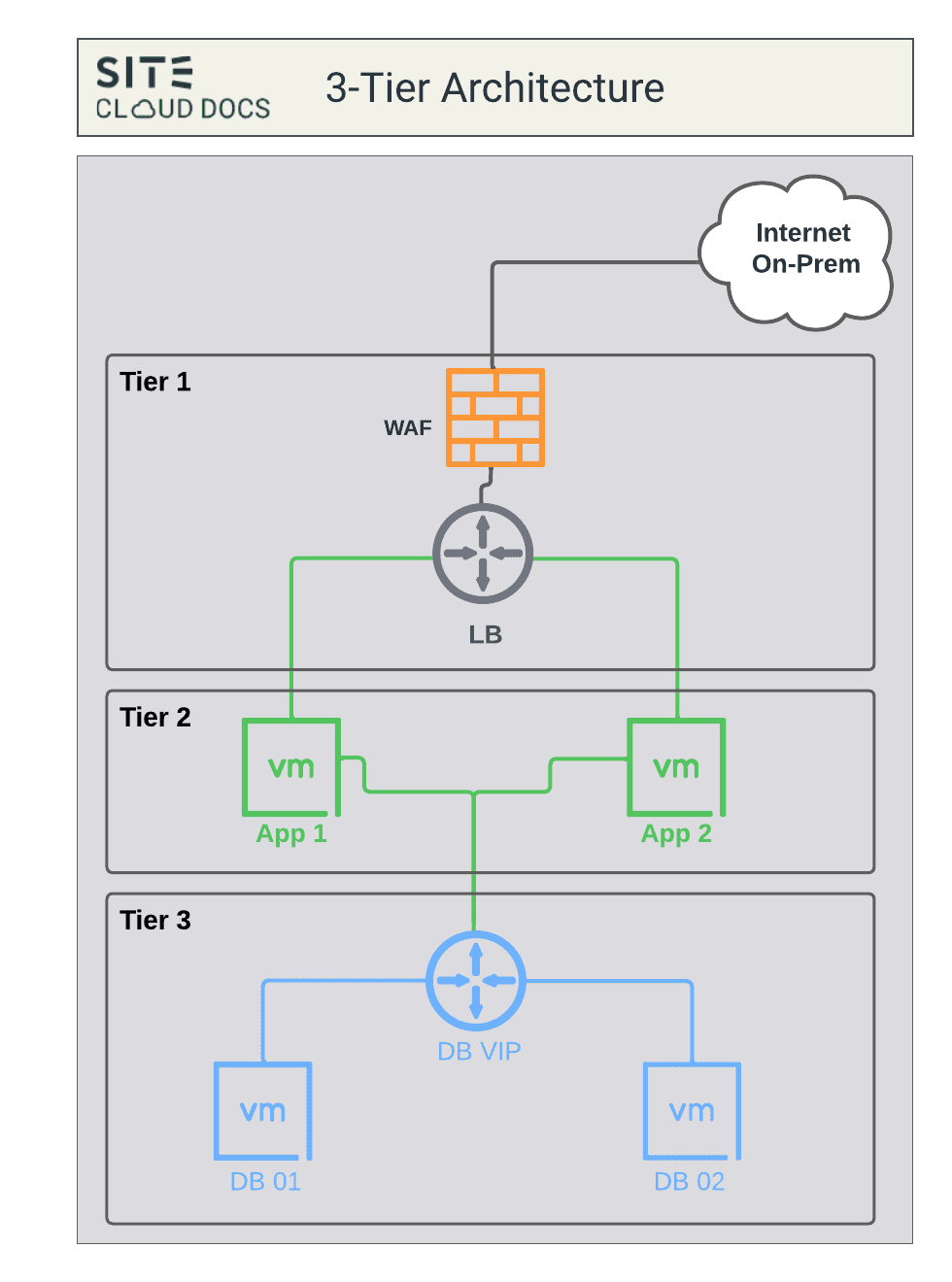
2.1.1 Tier 1: LB + WAF + SSL Termination Zone
2.1.1.1 Load Balancer (LB)
- Configure the load balancer to distribute incoming traffic evenly among application servers in Tier 2.
- Ensure high availability and scalability by setting up multiple application servers.
- Regularly monitor and adjust load balancing methods based on traffic patterns.
2.1.1.2 Web Application Firewall (WAF)
- WAF protects against common web application vulnerabilities.
- Configure WAF rules to filter and protect against malicious requests (Learning -> Blocking).
- Continuously update WAF rules to adapt to emerging threats.
- Integrate WAF with your monitoring and alerting system to detect and respond to security incidents.
2.1.1.3 SSL Termination
- Implement SSL termination at this tier to offload SSL/TLS encryption and decryption from application servers in Tier 2.
- Use a trusted SSL certificate for securing communication between clients and the load balancer.
- Regularly update SSL certificates to ensure security and compliance.
- Configure SSL policies to enforce encryption standards and security best practices.
2.1.2 Tier 2: Application VMs zone
2.1.2.1 Application VMs zone
- This zone hosts the application logic, business logic, and presentation layers of the system.
- It is responsible for processing user requests, executing application-specific tasks, and generating responses.
- Application VMs, middleware, web servers, and other necessary software components reside within this zone.
- It contains the codebase responsible for implementing the business logic and serving user interfaces.
- Communicates with the database servers (in the DB VMs zone) to retrieve, manipulate, and store data required by the application.
- Handles client requests, processes data, and interacts with other components in the architecture.
- Scalability is a critical factor in this zone, as it directly affects the application's responsiveness to user requests.
- Horizontal scaling (adding more application server instances) is commonly employed to handle increased traffic.
2.1.3 Tier 3: DB VMs zone
2.1.2.1 DB VMs zone
- This zone is dedicated to hosting the database management systems (DBMS) and storing the application's data.
- It manages, stores, retrieves, and manipulates data based on requests received from the application servers.
- Database servers, database management systems (e.g., MySQL, PostgreSQL, MongoDB), and related software are deployed in this zone.
- Stores structured or unstructured data required by the application, such as user information, transaction records, configurations, etc.
- Receives and responds to queries from the application servers, providing the requested data or performing necessary operations.
- Scalability in this zone involves optimizing database performance, ensuring efficient query execution, and managing data storage requirements.
- Vertical scaling (increasing resources like CPU, memory, or storage) or employing techniques like sharding and replication may be used to scale databases.
2.2 Implementation
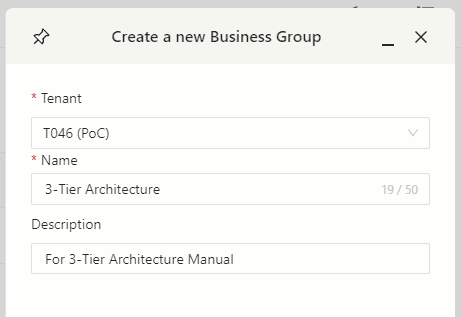
2.2.1 Create your BG.
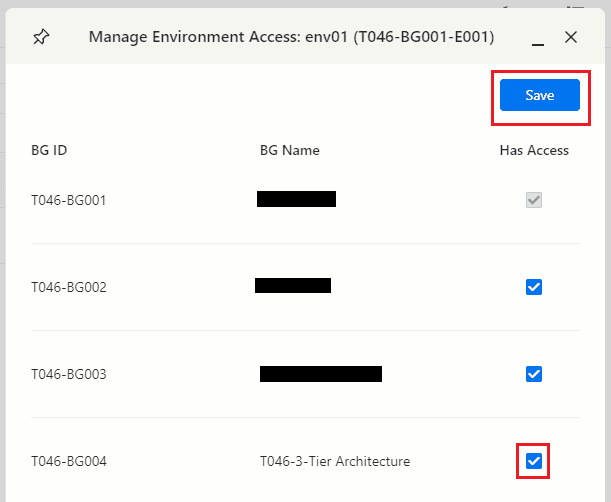
2.2.2 Enable envirenmet access for the BG.
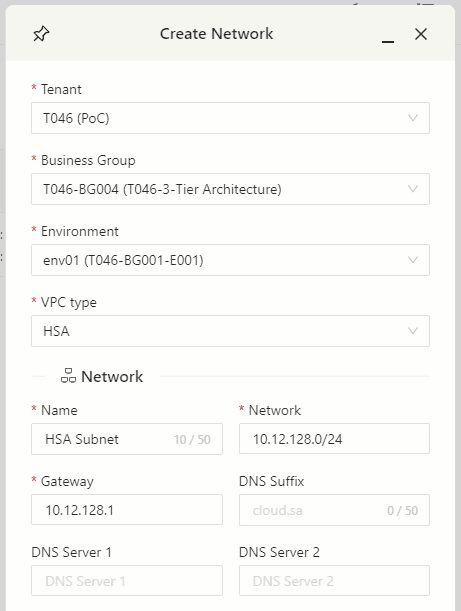
2.2.3 Create your subnets.
- Navigate to the subnets page, and find the BG you’re working on. We’re going to create 2 subnets.
- SSA Subnet
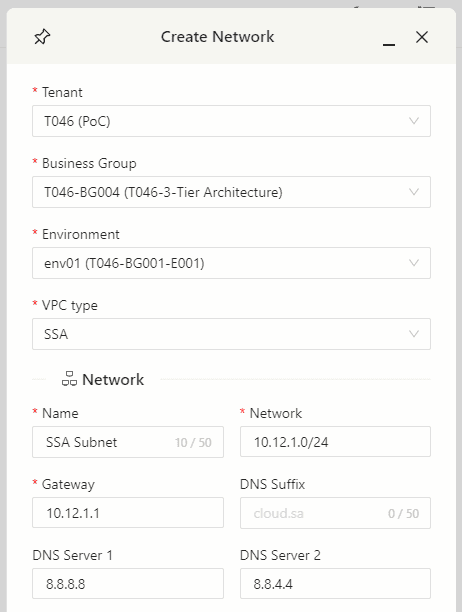
- HSA Subnet
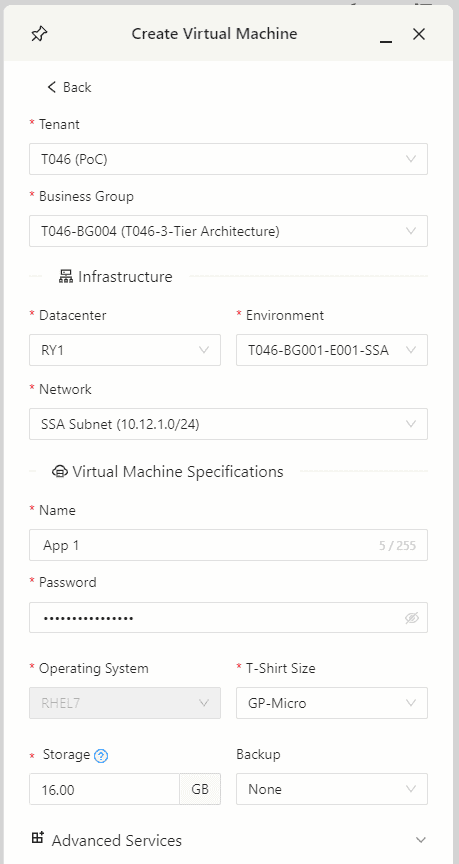
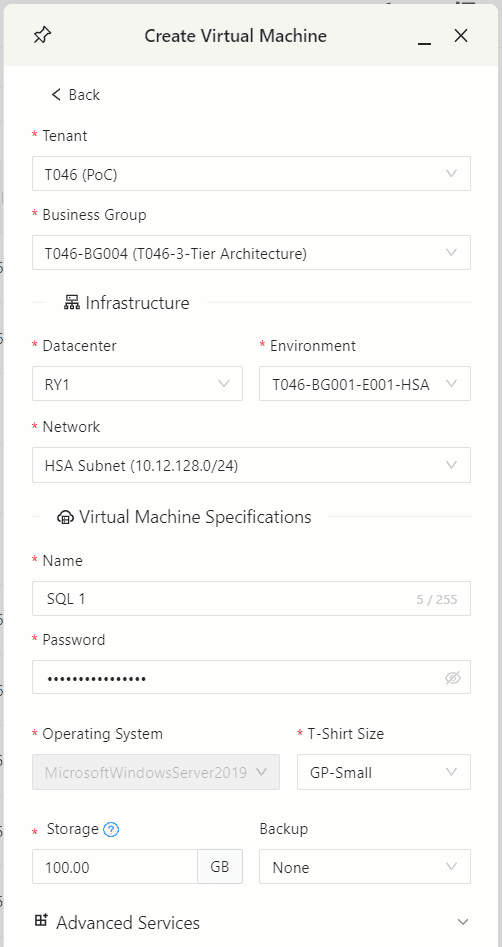
2.2.4 Create your VMs.
App VMs will be placed on SSA zone and DB VMs will be placed on HSA zone.
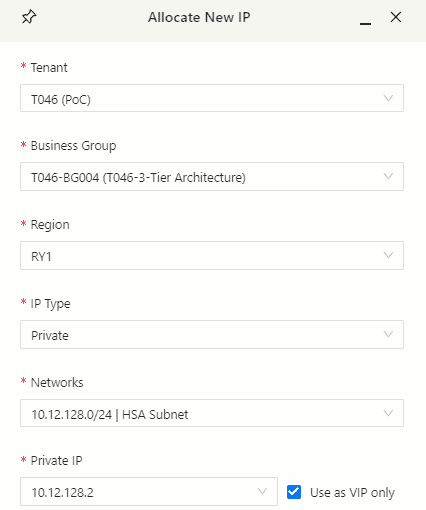
2.2.5 Allocate VIP to DB cluster.
2.2.6 Create the needed firewall rules between VMs.
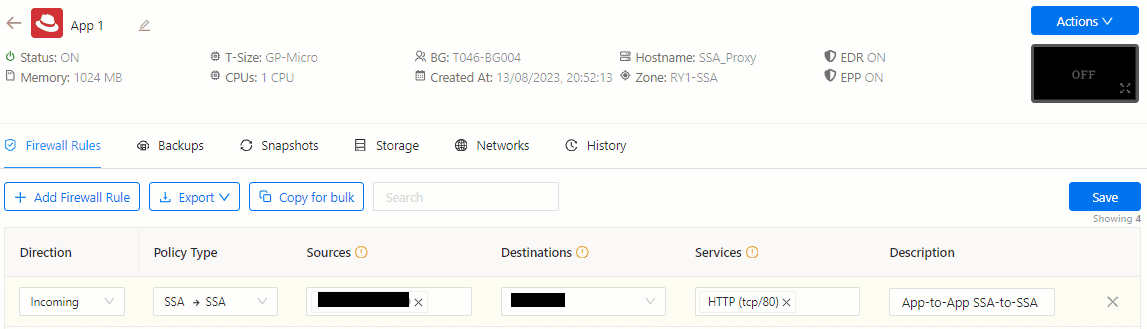
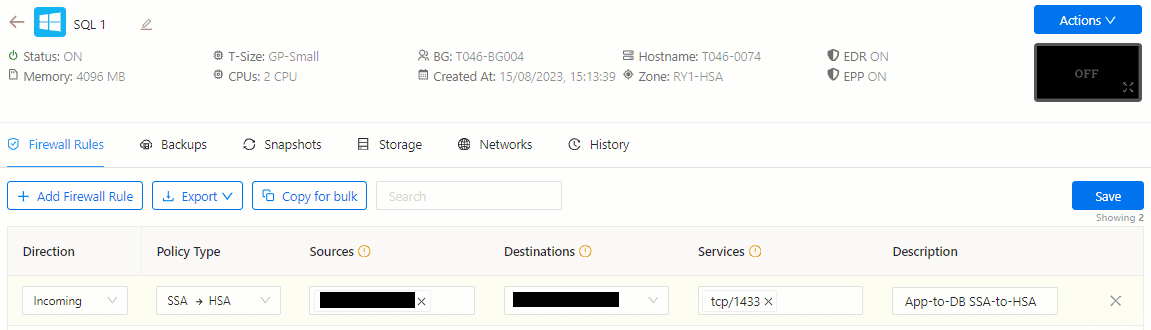
- Due to the zero-trust policy, you will need to open the needed ports between your VMs.
- App-to-App SSA-to-SSA.
- App-to-DB SSA-to-HSA.
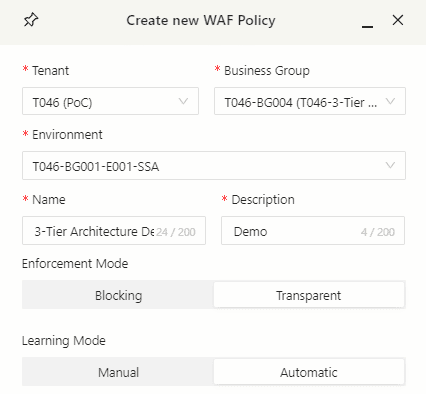
2.2.7 Create a WAF profile.
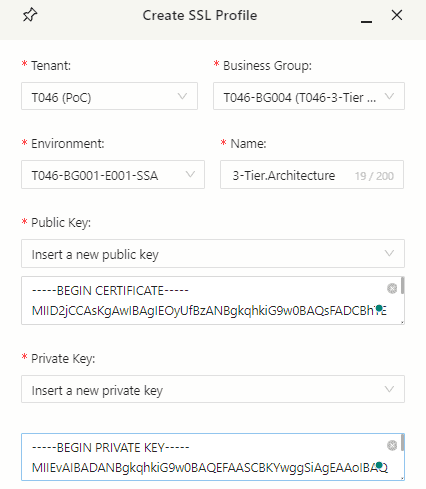
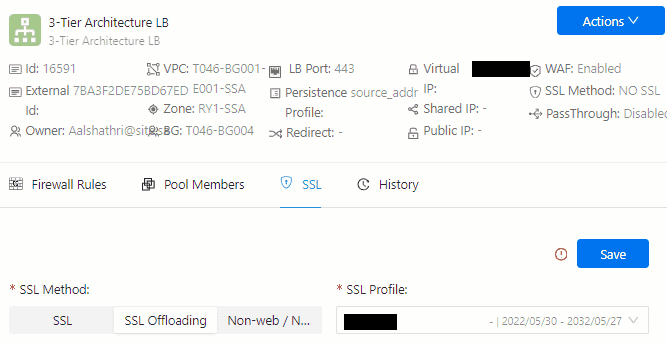
2.2.8 Create an SSL profile.
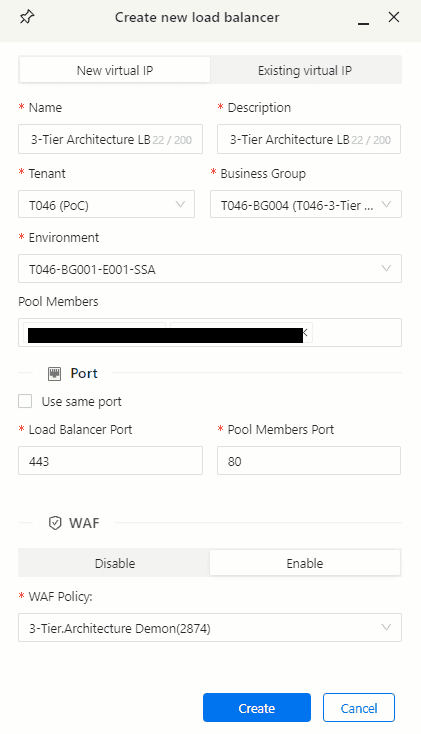
2.2.9 Create LB and Assign WAF profile.
2.2.10 Assign SSL profile.
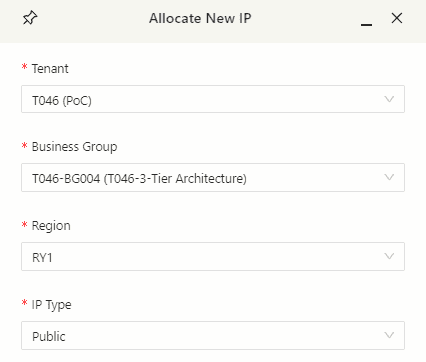
2.2.11 Allocate Public IP to the BG.
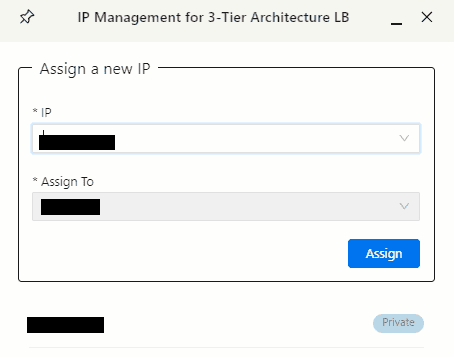
2.2.12 Assign public IP to LB.
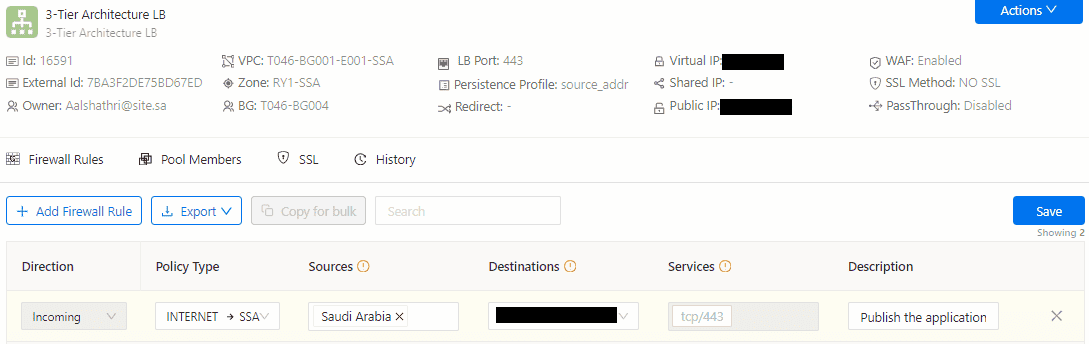
2.2.13 Publish the application.
3. Safety and Security
3.1 Safety and Security
- Implement access controls to restrict who can configure and manage your tenant.
- Regularly update the app software to patch security vulnerabilities.
- Enable logging and monitoring and forward it to SITE SIEM to detect and respond to unusual activities or potential attacks.
- Ensure that SSL certificates are obtained from a reputable Certificate Authority (CA).
- Implement strong encryption ciphers and protocols to secure data in transit.
- Periodically review SSL configuration to maintain compliance with security standards.
- Monitor SSL/TLS vulnerabilities and apply patches promptly.
4. Glossary and References
4.1 Glossary
- Load Balancer (LB): A product that distributes network traffic across multiple servers to ensure high availability and optimal performance.
- Web Application Firewall (WAF): A security solution that protects web applications from various cyber threats and vulnerabilities.
- SSL Termination: The process of decrypting SSL/TLS-encrypted traffic at a specific point in a network, often at the load balancer, before forwarding it to the application servers.
- SSL Certificate: A digital certificate that verifies the authenticity of a website and encrypts data transmitted between the client and the server.