


EDR & EPP Installation and configuration guide
Introduction
This guide provides installation and configuration instructions for check and validate EDR and EPP visibility.
Please note that any VM created on SITE’s community cloud is auto provisioned with an EPP & EDR Agent installed by default. These agents secure endpoints with a multi-method prevention approach that blocks known and unknown malware and exploits before they compromise endpoints and help us with ongoing monitoring of endpoints and network events and recording of the information in a database where further analysis, detection, investigation, reporting and alerting take place.
Check EDR & EPP Status
In order to check current status of EDR and EPP agents you may access SITE Cloud portal and navigate to: Virtual Machines tab as screenshot below and check the current EDR & EPP status.
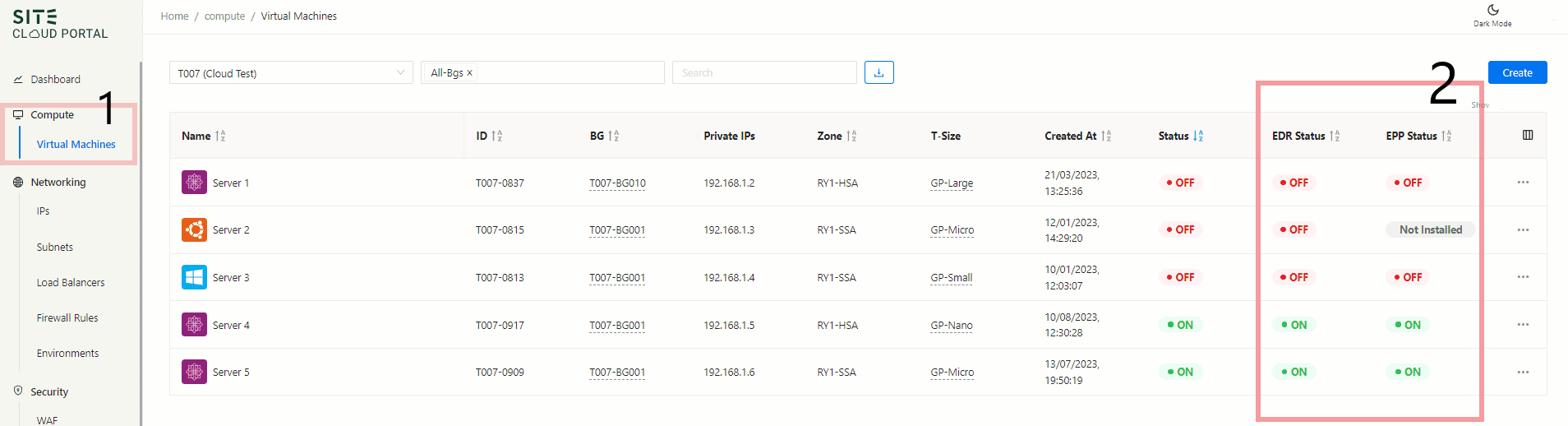
Status details:
- ON: The agent is up and run normally.
- OFF: Either Machine is off or agent service is off.
- Not Installed: Agent has not been installed or removed.
How to Install EDR/EPP
In order to install EDR/EPP agents, Click on the machine tab, then select the virtual machine which has a limited visibility, the click on "Not installed" and follow the steps to install EDR/EPP on your machine, as shown in the screenshot below.
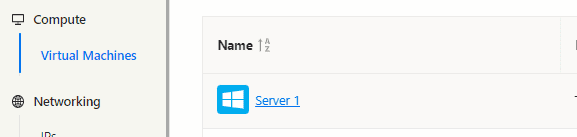
After Selection of the server, click on "Not installed", follow the steps to install agents for both EDR and EPP.

Steps samples for installing EPP Agent:

Steps samples for installing EDR Agent

How to Reinstall the EDR agent
to remove the EDR sensor on an endpoint, Kindly utilize the below:
Uninstall EDR Sensor from Windows endpoints
Procedure:
- Open an elevated command prompt window. (Right Click CMD.exe and select "Run as Admin")
- Ensure your current working directory is not in the installed sensor's path by running cd c:\
- Then run: %WINDIR%\\CarbonBlack\\uninst.exe /S
Uninstall EDR Sensor from Linux endpoints
Procedure:
- You must be a root user or have “sudoer” permissions and run the installer with “sudo”.
- Run the following command: /opt/carbonblack/response/bin/sensoruninstall.sh
then install the agent again as shown in the How to Install EDR/EPP section