

Search...


Quarantine Logs
Quarantine Logs Viewer
View detailed logs explaining why an email was quarantined in your Mail Gateway. This feature provides transparency into all filtering phases the email went through, such as spam detection, antivirus scanning, and other security checks.
What’s New?
When you open a quarantined email, you’ll now see a log view showing:
- A breakdown of each stage the message passed through
- The exact reason the message was flagged or blocked
- Details from spam engines, antivirus scans, and any custom rules
This makes it easier to investigate issues and understand the behavior of the filtering engine.
How to Access
- From Cloud Portal left menu, go to Mail Gateway
- Select the relevant domain
- Navigate to the Quarantine tab
- Find and click the email you want to inspect
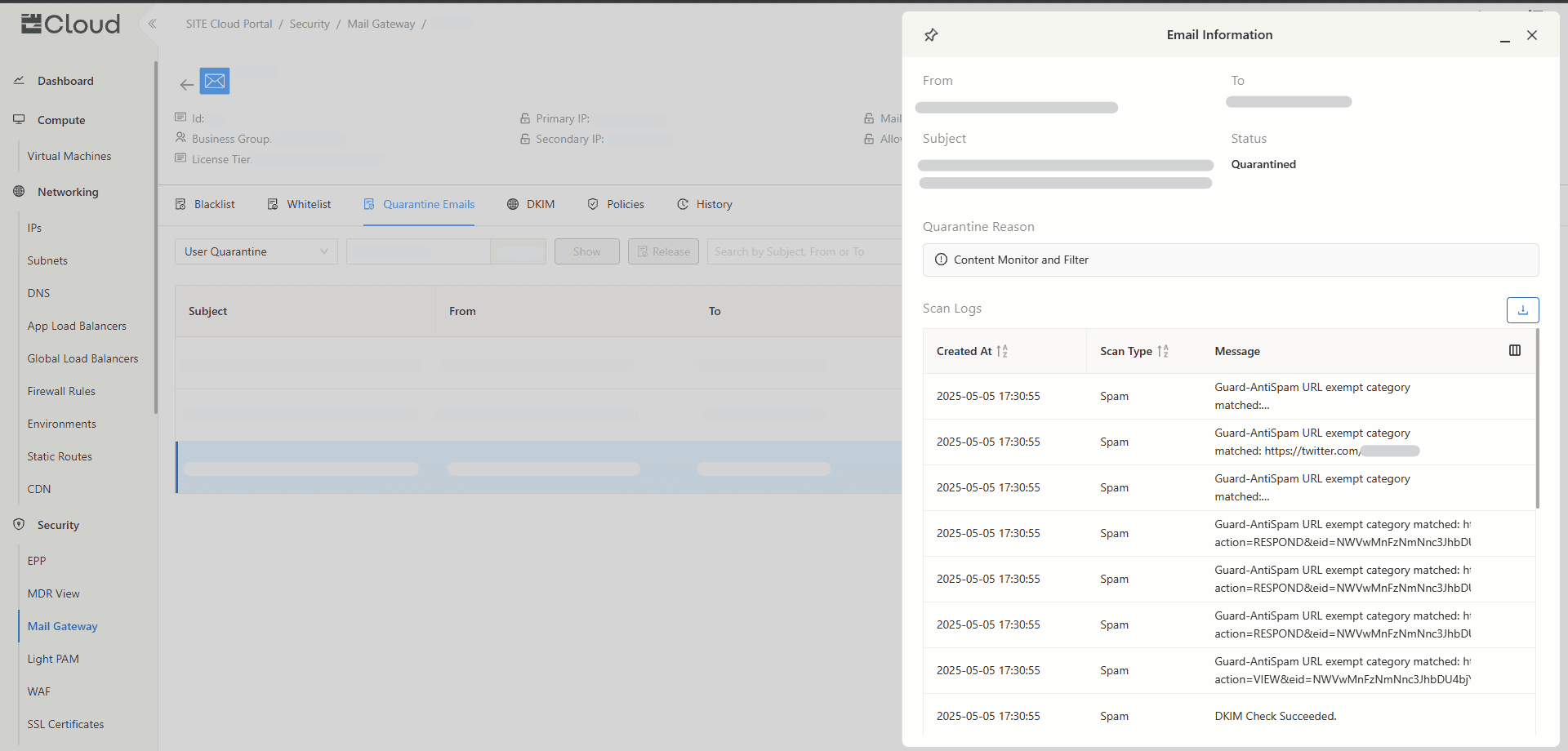
The log view will open in a modal with detailed event-level data on how the message was handled.
Use Cases
- Troubleshooting false positives
- Understanding which rule or engine caused a quarantine
- Verifying security actions for compliance or audit purposes
Created at 2025-05-15
On this page