


SITE Ray - Onboarding Guide
Introduction
Welcome to the SITE Ray Onboarding Guide. This guide is designed to help you get started with SITE Ray, our premier online collaboration and meeting platform. Whether you are a new user or an experienced team member, this guide provides essential information to ensure a smooth and efficient onboarding process.
For detailed navigation and usage instructions, please refer to the SITE Ray User Guide.
How to Login & Use
- Access the platform at: https://xxx.ray.sa
- Sign in using your organization email (e.g., user@organization.sa)
- A one-time password (OTP) will be sent to your inbox for verification
- Optional: ADFS Single Sign-On (SSO) with MFA is supported upon request
Ray Applications and Accessibility
The service is also accessible via mobile applications:


- Admin Portal Access:
Can be granted upon request for managing users and settings. - Outlook Integration Plugin:
Available upon request to enable calendar and meeting scheduling integration.
Firewall and Communication Requirements
To ensure uninterrupted access and a seamless experience, please apply the following configurations:
IPs/Domains | Ports | Affected Controls for End-Users |
|---|---|---|
176.105.148.217 | 443 TCP | Endpoint management, networking devices, firewalls, proxy, any inspection services that may impact real-time applications (streaming and conferencing)
|
176.105.148.218 | 20000 to 50000 UDP/TCP | |
176.105.149.38 | TCP/443 & UDP/5394 & UDP/3478 | |
176.105.148.221 | TCP/443 & UDP/5394 & UDP/3478 | |
*.ray.sa | Whitelist on Corporate firewall / polices |
Client ADFS Integration Requirements
The provisioning allows three authentication methods; namely Email OTP, SITE SSO, and Custom SSO. For a client that requires Custom SSO having their own AD integrated to their provisioned instance, following are the directions required:
- Provide ADFS Certificate file [.cer]
- Provide (LS) endpoint URL
- On your ADFS Configuration of Relying Party Trusts, on its properties:
- Add/Edit Identifier:
- https://<tenant_subdomain>.ray.sa/_saml/metadata.xml
- Add/Edit Endpoint:
- https://<tenant_subdomain>.ray.sa/_saml/metadata.xml
- as POST, preferably index 0
- https://<tenant_subdomain>.ray.sa/_saml/metadata.xml
- as Redirect, preferably index 1
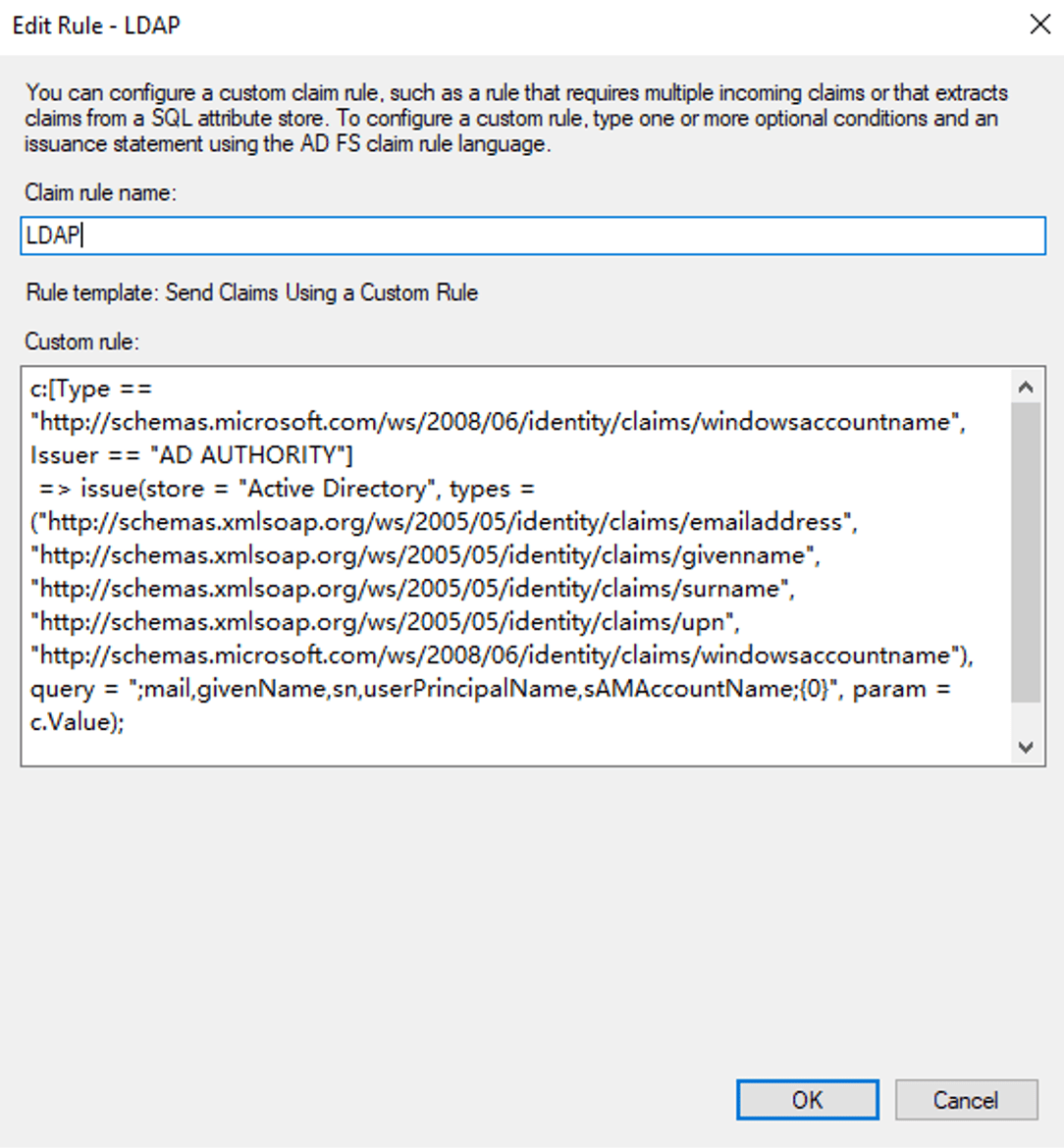
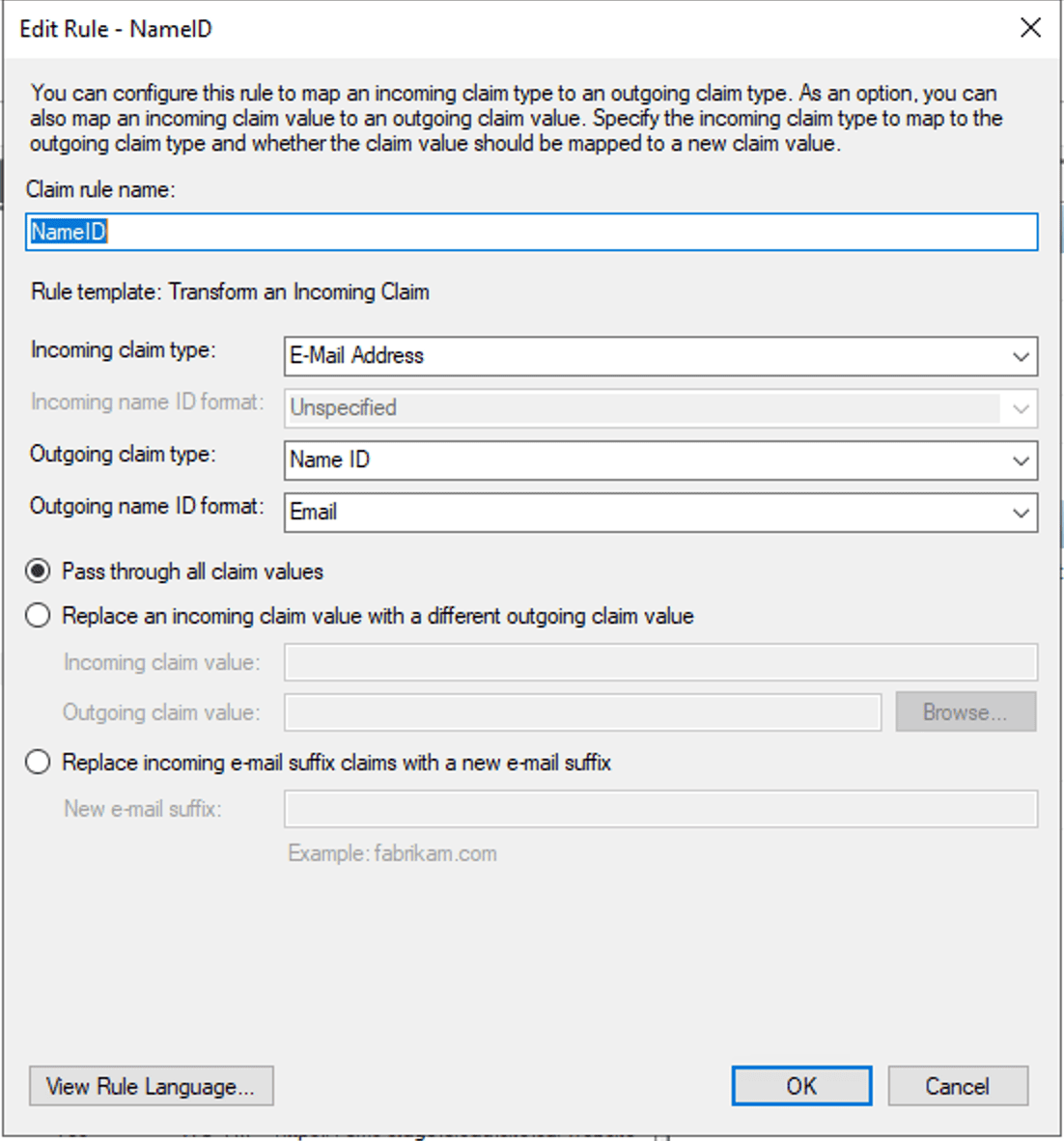
- In Edit Claim Issuance Policy:
- Two rules are needed:
- Send Claims Using a Custom Rule Claim rule name: LDAP
- Two rules are needed:
- https://<tenant_subdomain>.ray.sa/_saml/metadata.xml
- Add/Edit Identifier:
c:[Type == "http://schemas.microsoft.com/ws/2008/06/identity/claims/windowsaccountname", Issuer == "AD AUTHORITY"] => issue(store = "Active Directory", types = ("http://schemas.xmlsoap.org/ws/2005/05/identity/claims/emailaddress", "http://schemas.xmlsoap.org/ws/2005/05/identity/claims/givenname", "http://schemas.xmlsoap.org/ws/2005/05/identity/claims/surname", "http://schemas.xmlsoap.org/ws/2005/05/identity/claims/upn", "http://schemas.microsoft.com/ws/2008/06/identity/claims/windowsaccountname"), query = ";mail,givenName,sn,userPrincipalName,sAMAccountName;{0}", param = c.Value);
- Transform an Incoming Claim

How to Get Support
For assistance, you may reach out via any of the following channels:
- Phone: +966 11 813 1100
- Email: support@site.sa
- Support Portal: support.cloud.site.sa
- User Guide for Support: https://docs.cloud.site.sa/Support/User-Manual